

|
Footnote 1: Games.com - play Gravitar online I wish the keyboard controls on Games.com were set up in the same configuration as the real control panel They use the: Up, Left, Right, Z and Space keys. When I play Gravitar in Mame on my computer keyboard the keys I use are these (as they are in a similar position to the layout of the arcade control panel): S - rotate left, D - rotate right, K - Thrust, L - Fire, Space - Tractor/Shield ~ I have emailed the sugestion... so far no response. |
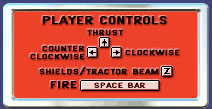 Games.com - Gravitar controls |
 To enlarge the game on screen, press Maximize button. |